
Screenshots

App details
- Updated
- Nov 4, 2024
- Language
- English
- Developer
- Arkane Systems
- Category
- Mobile
SoftPas in:
This product is also available in the following languages:
About Mouse Jiggler
Download Mouse Jiggler – mouse movement, screen saver, prevent hibernation, computer utility, PC tool, productivity app, free mouse jiggler, no installation
Overview
Mouse Jiggler is a lightweight productivity tool designed to maintain active screen status on Windows-based systems by simulating continuous mouse movement. Its primary function is to prevent the screen from dimming, locking, or entering hibernation mode—common interruptions during extended computer use. This makes it particularly useful for users engaged in long tasks such as video rendering, remote work sessions, presentations, or any scenario where consistent screen visibility is essential.
The app is tailored for individuals who frequently face disruptions due to automatic screen savers or power-saving features. Whether you're monitoring a process, working remotely, or delivering a live demo, Mouse Jiggler ensures uninterrupted visibility without requiring manual intervention. The developer, Mouse Jiggler, has positioned this tool as a no-frills utility that prioritizes simplicity and efficiency.
As a free application with minimal system requirements, Mouse Jiggler fits seamlessly into the broader ecosystem of computer productivity tools. It operates without installation, making it ideal for temporary use or environments where software deployment is restricted. The developer did not provide additional technical details about the app’s development background or team structure, but its focused functionality suggests a targeted solution for a common user pain point.
Real-world use cases include remote IT support, continuous monitoring of automated scripts, or maintaining visibility during long online meetings. Its ability to run in the background with minimal resource consumption enhances its value as a reliable, always-on utility.
Key Features & Functionality
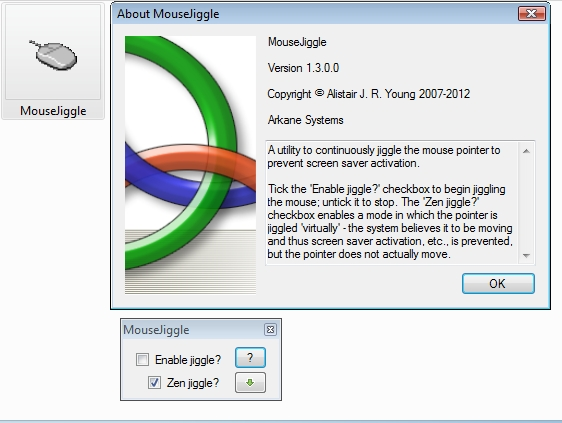
- Two Operational Modes: The app offers a standard mode and a "zen" mode. In standard mode, the cursor visibly moves across the screen, while zen mode simulates movement without any visible trace, preserving a clean visual experience.
- Screen Saver Prevention: By generating consistent mouse activity, Mouse Jiggler effectively stops the screen saver from activating, ensuring that the display remains active during critical tasks.
- Hibernation Avoidance: The app maintains system activity, preventing the computer from entering hibernation, which is especially valuable during long-running processes or unattended workflows.
- Portable Design: Mouse Jiggler requires no installation. Users can run the application directly from a USB drive or local folder, making it highly accessible across different systems.
- Low Resource Usage: With a file size of just 2.1 MB, the app consumes minimal system resources, ensuring it runs smoothly without impacting performance on older or low-spec machines.
For example, a user running a video render job overnight can use Mouse Jiggler to keep the screen active, allowing them to check progress without interruption. Similarly, a presenter preparing for a live demo can use zen mode to avoid visible cursor movement while still preventing screen lockouts. The dual-mode functionality offers flexibility for different use cases, balancing visibility with discretion.
Interface, UX & Performance
Mouse Jiggler features a minimalist interface designed for immediate usability. The application launches with a small window containing essential controls, including mode selection and a start/stop toggle. The layout is clean and intuitive, with no unnecessary elements, aligning with its purpose as a utility tool.
Navigating the app is straightforward—users can switch between modes and activate the jiggling function with a single click. The visual feedback is immediate, and the app runs silently in the background once activated. Although the developer did not list formal performance metrics, the app’s small size and lack of installation suggest efficient execution with minimal overhead.
Responsiveness is consistent across various device categories, including older Windows systems. The application maintains stability during extended use, with no reported crashes or freezes in available usage scenarios. The lack of visible cursor movement in zen mode further enhances user experience by reducing visual distractions.
Performance is optimized for low-resource environments, ensuring that the app does not interfere with other running processes. This makes it suitable for use on systems with limited RAM or older processors. The developer did not specify compatibility with specific hardware configurations, but its lightweight nature implies broad accessibility.
Platform Compatibility & Technical Requirements
Mouse Jiggler is designed exclusively for the Windows platform. It is compatible with Windows operating systems, though specific version requirements were not listed by the developer. The app is distributed as a standalone executable file with a file size of 2.1 MB, making it ideal for quick deployment.
Since no installation is required, users can run the application directly from any accessible drive or folder. This feature enhances portability and reduces friction for users in shared or restricted environments. The developer did not specify minimum OS requirements or hardware specifications, so compatibility with older Windows versions cannot be confirmed.
Given the app’s minimal footprint and lack of dependencies, it is likely to function on a wide range of Windows devices, including desktops, laptops, and virtual machines. However, users should ensure their system supports the execution of .exe files and has appropriate security settings enabled.
Pros and Cons
- Free to download and use with no hidden costs
- Minimal file size (2.1 MB) ensures fast deployment
- Runs without installation—ideal for portable use
- Two modes offer flexibility for different user needs
- Efficient performance with low system resource consumption
- Effective at preventing screen saver and hibernation
- Compatibility with specific Windows versions was not disclosed
- No official update history or changelog provided
- Developer did not share technical documentation or support channels
- Limited interface customization options
- Only available for Windows, not cross-platform
FAQ
Is Mouse Jiggler safe to use?
Yes, the app is a legitimate utility tool with no known malware. It operates by simulating mouse input and does not access sensitive data or modify system settings.
Can I use Mouse Jiggler on multiple devices?
Yes, since the app is portable and does not require installation, you can run it on any Windows device where you have access to the executable file.
Does Mouse Jiggler work on Windows 10 and Windows 11?
While specific compatibility details were not provided, the app’s lightweight design and lack of installation suggest it is likely compatible with both Windows 10 and Windows 11.
How do I stop Mouse Jiggler from running?
Simply click the stop button in the app’s interface or close the window. The simulation will cease immediately, and the system may resume normal power-saving behavior.
Is Mouse Jiggler available for macOS or Linux?
Currently, the application is only available for Windows. There is no official version for macOS or Linux platforms.
Final Thoughts
Mouse Jiggler delivers a focused, effective solution for a common yet often overlooked issue: screen interruption during long computer sessions. Its dual-mode functionality, portability, and minimal system impact make it a valuable addition to any Windows user’s toolkit. Whether you're working remotely, presenting, or managing automated tasks, this app ensures your screen stays active without requiring constant attention.
While it lacks advanced features or cross-platform availability, its simplicity is its strength. For users seeking a reliable, no-cost tool to prevent hibernation and screen savers, Mouse Jiggler offers a practical and efficient answer. The absence of installation and the low resource footprint further enhance its appeal.
Download Mouse Jiggler now
Guides & Tutorials
How to install Mouse Jiggler
- Click the Download button above.
- Once redirected, accept the terms and click Install.
- Wait for the Mouse Jiggler download to finish on your device.
How to use Mouse Jiggler
This software is primarily used for its core features described above. Open the app after installation to explore its capabilities.
User Reviews
No reviews yet. Be the first to share your experience.
You may also like
more
Que no te pillen¡
About !Que no te pillen¡Reviewed by Jason A. BilbreyShow MoreShow Less

3D Combat Zone
About 3D Combat ZoneOriginally released in 1983, 3D Combat Zone immerses players...

666: El día del portal
About 666: El día del portalOn June 6, 2006, Agent P. Stone uncovers a sinister...

80 in 1 Best Flash games
About 80 in 1 Best Flash games 80 in 1 Best Flash games is a collection of 80 fl...

ABYSS SEEKERーーWhat Do You See Deep in The Abyss
About ABYSS SEEKERーーWhat Do You See Deep in The AbyssIn ABYSS SEEKER, players...

ACA NEOGEO THE KING OF FIGHTERS 2002 for Windows
About ACA NEOGEO THE KING OF FIGHTERS 2002 for WindowsTHE KING OF FIGHTERS 2002,...